Palettes
Read a text through the lens you need
A palette is a set of colours, each with a description of what to mark. Five come with Colorphrase; make your own in a minute.
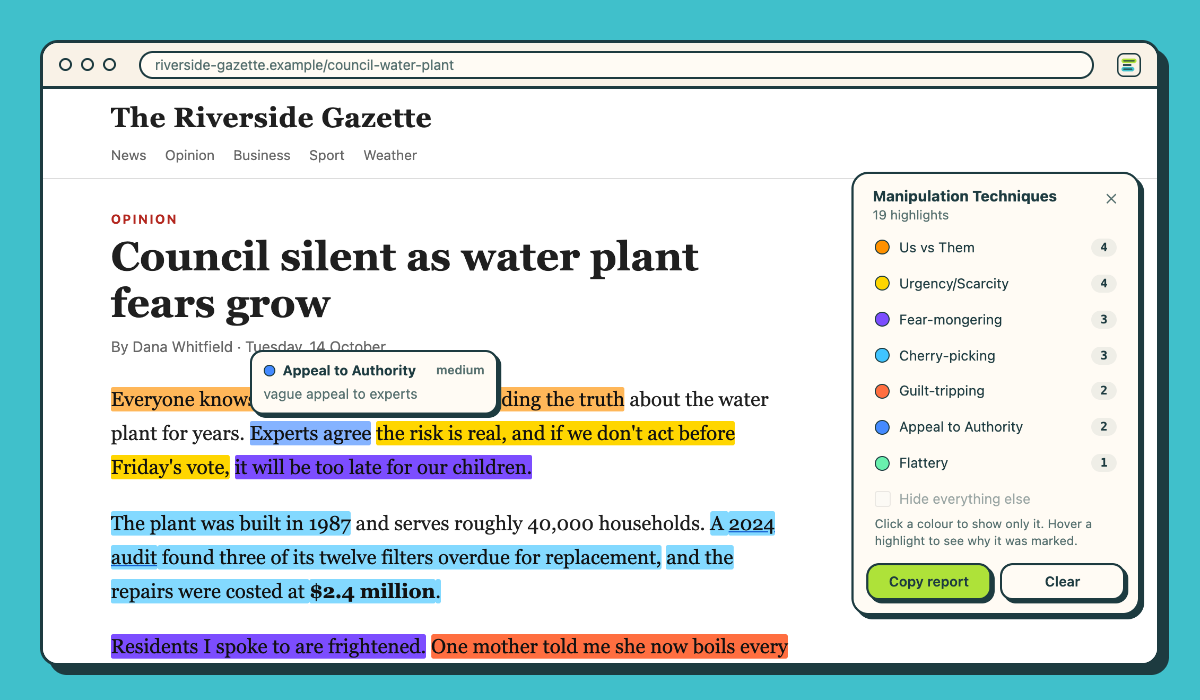
Manipulation techniques
Fear-mongering, us vs them, urgency, appeals to authority, flattery, guilt-tripping, cherry-picking.
Fact vs opinion
What can be checked, what is someone's view, what is a guess about the future.
Emotions
Fear, anger, sadness, shame, hope: what each phrase is built to make you feel.
Your own
"Praise", "Complaint" and "Specifics" for product reviews, or anything you need: a name and a description per colour.
How it works
Select, right-click, read
- Set up once. After installing, click "Download the model": Chrome fetches its built-in AI, Gemini Nano (about 4 GB), and keeps it on your computer.
- Select text on any page — a paragraph or a whole article — then right-click → Colorphrase → a palette, or press ⌘⇧Y (Ctrl+Shift+Y).
- Read it in colour. Links and layout stay as they were. Hover a highlight for its reason, click a colour in the legend to show only it, copy a report, or clear the page.
Needs desktop Chrome 138 or later, 22 GB of free disk space, and a graphics card with more than 4 GB of memory or 16 GB of RAM. Works best in English, Spanish, Japanese, German and French.
Privacy
Your text never leaves your computer
Colorphrase runs on Chrome's own built-in AI, on your computer. There is no server, no account, no API key and no analytics: the extension makes no network requests at all. It reads a page only when you ask it to. The privacy policy says exactly what it handles.